Calls Tab Enhancement
{name_english}
/
Automated Clearing House (ACH)
A computer-based funds transfer system established by NACHA to process the exchange of transactions between participating financial institutions in the U.S.; uses batch processing and a store-and-forward system.
BACS Global ACH – Bankers’ Automated Clearing System
BACS payments are electronic payments where money in GBP moves from one bank account to another within the United Kingdom. This is similar to ACH, however since these payments are processed in UK, they are transmitted by BACS Payment Schemes Limited.
Checkprint
A check that is printed and cut by the bank instead of in-house of the business. The user submits check print files for the Bank to print and distribute to vendors.
FedWire Domestic Wire USD
An electronic funds transfer system that occurs in real time for central bank funds. It is used by Federal Reserve banks to transfer funds between participating member institutions. No physical money is transferred between banks or financial institutions when conducting a wire transfer. Instead, information is passed between banking institutions about the recipient, the recipient bank account number, and the amount transferred.
Global ACH / CPA Payments
Electronic payments where money moves from one bank account to another within Canada. This is similar to ACH, however since these payments are processed in Canada, they are transmitted with the help of the Canadian Payments Association (CPA) network.
International Wire USD
An electronic transfer of funds sent internationally across a payment network administered by hundreds of banks or transfer service agencies across the world. No physical money is transferred between banks or FIs when conducting a wire transfer. Instead, information is passed between banking institutions about the recipient, the recipient bank account number, and the amount transferred. Sent from an USD origin account, funds may be exchanged into the local currency once deposited into the payees bank account.
Positive Pay
An automated cash-management service offered by financial institutions for fraud prevention. Checks that a company presents for payment are matched against the checks that were issued by the company to detect check fraud.
FISPAN helps the client to digitally transmit a list of checks that it has issued physically via mail. The bank compares the list to the actual checks, flags any that do not match, and notifies the client. The client will then tell the bank whether or not to cash the check.
SEPA (Single Euro Payments Area)
A system that harmonizes the way cashless payments transact between European countries in euros, created by the European Union (EU). You can now use your debit card anywhere in this area and do easy cross-border bank transfers.
Single Use Account (SUA) aka Virtual Card Network (VCN)
A Single-Use Account is a card-based payment solution that acts like a check by providing a 16-digit virtual account number for each payment. The credit limit of each card is determined by the specific payment amount. SUA payments are issued by email to the Vendor.
The FISPAN Approval Portal allows for a seamless experience from payment initiation in your ERP to the release of payments. If you are using the Approval Portal, all payments (including positive pay) will be held for approval.
asda asda sd asdasdasdsaUsing the Approval Portal
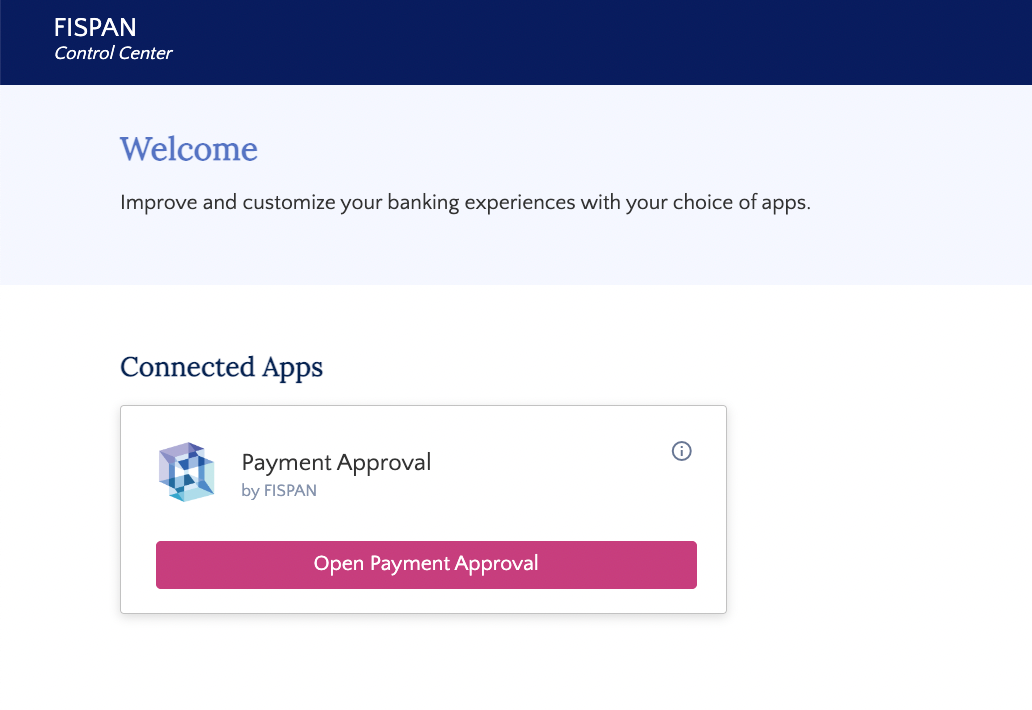
Once you log into after the Approval Portal has been activated, you can find a 'Open Payment Approval' button by hovering over the Payment Approval card in the Control Center.
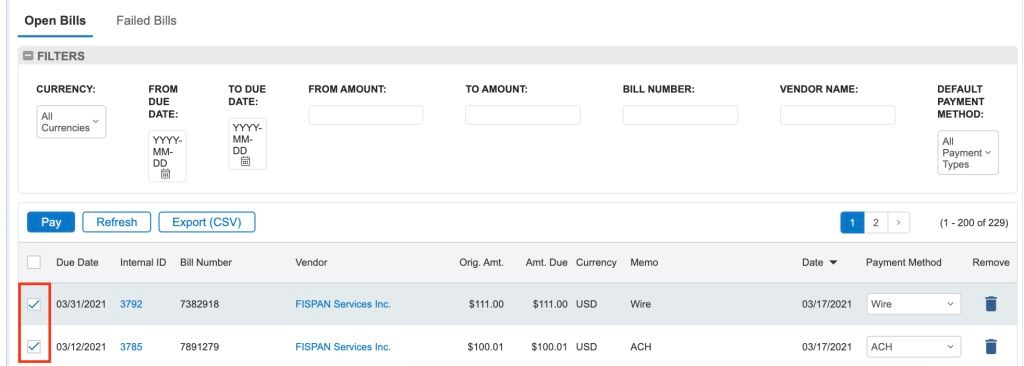
Process a payment through the Pay Bills page in the bank plugin of your ERP.
Please note that the example above depicts the Pay Bills page in the Sage Intacct bank plugin. This page may look different depending on which ERP you have installed the bank plugin in.
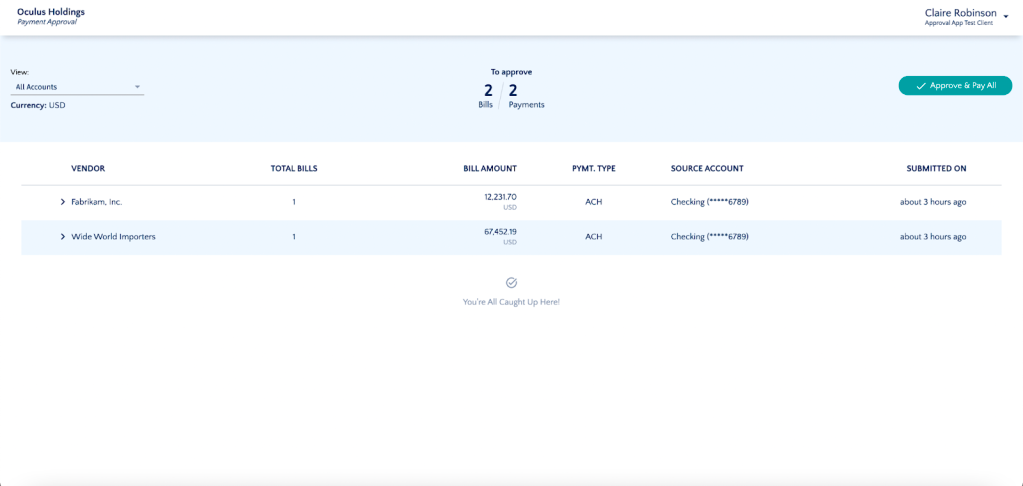
A permissioned user logs into the Payables Approval Portal to view payments sent from the plugin for Rejection or Approval + Release.
Rejecting a Payment
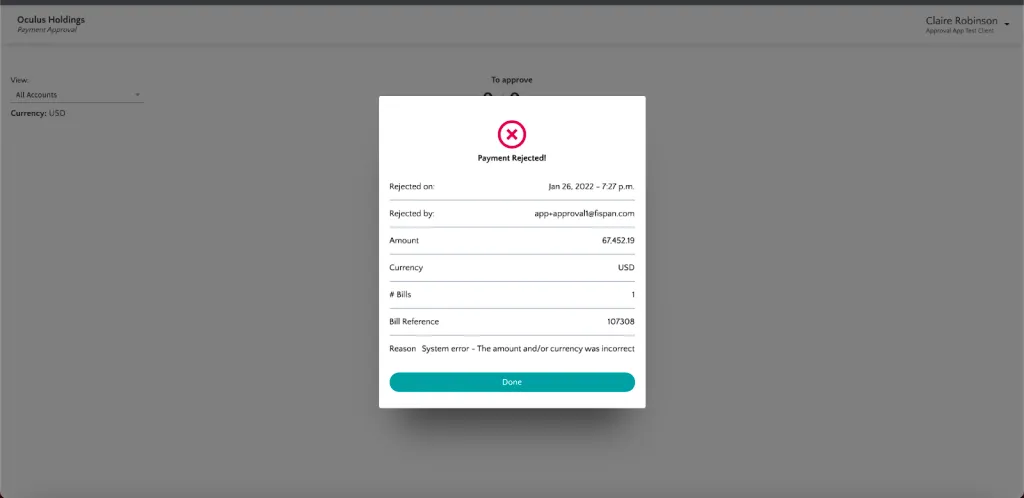
Reject the payment within Approval Portal.
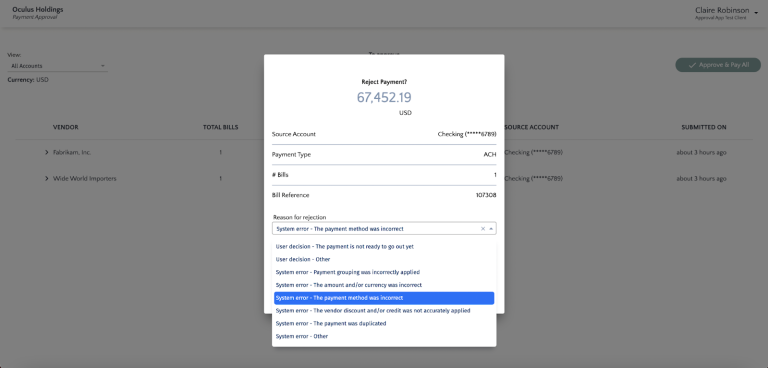
Select a reason for rejection. Once rejected, the payment is sent back to the ERP and is reopened, thus becoming available to be repaid.
Approving Payments (one-by-one)
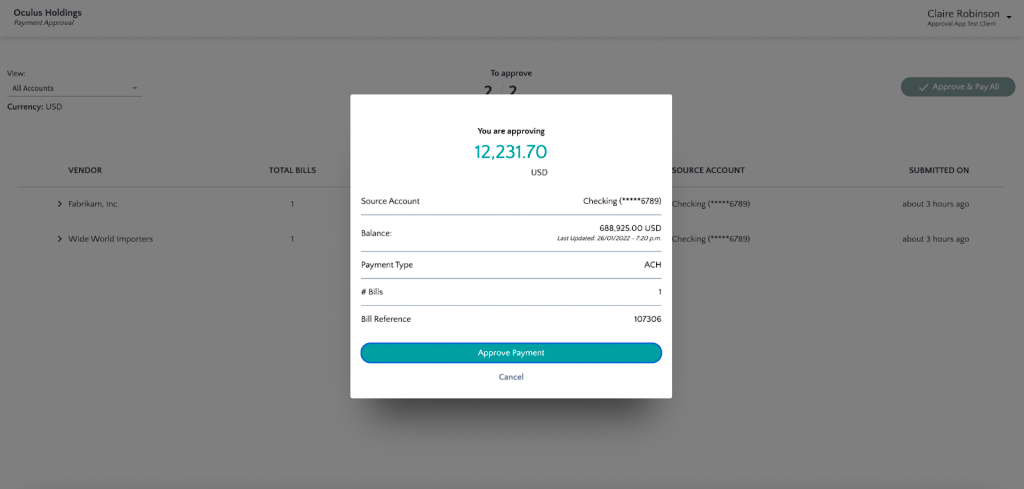
Approve the payment one by one.
Approving Payments (multiple payments)
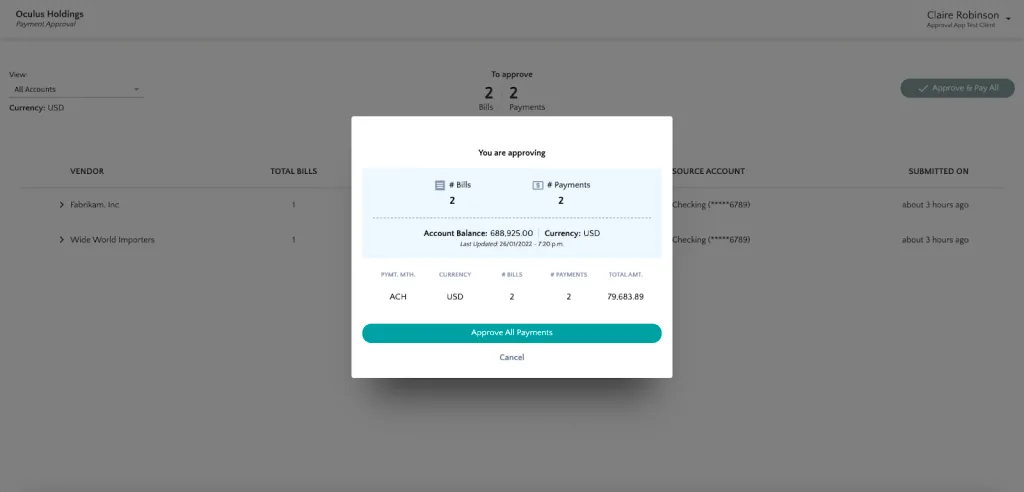
Approve multiple payments in one click.
Litmus Unify (Unify) is a high-performance, secure, and highly available data hub that is designed for scalability. It is built upon an enterprise-class MQTT engine for better functionality and reliability.
You can access Unify using any of the following:
- Web UI (User Interface)
- APIs
-
- time.bsn.cloud
/emb
Security
Unify is designed with security integrated at every stage to meet the specific demands of Industrial IoT.
It offers:
- Deployment Security: Supports offline first and air-gapped installation.
- Authentication and Authorization: Enterprise-ready authentication, authorization, and RBAC (Role-Based Access Control) policies. The Unify user interface is only accessible with a login and password.
- Platform Access Security: Protected and modern HTTPS web interfaces.
- Certificate Management: Includes a default self-signed certificate, and therefore, all communications are secure by default.
- Encryption: All communication between a Unify device and user’s browser is protected by transport layer encryption.
- Software Update: Over-the-air update systems implement detailed hash and other verifications.
- Token-Based Security: Provides token-based security for app authentication.
- Data Access Security: Secure and isolated message broker for real-time data subscription.
Features
Unify offers a set of features that allows you to implement your UNS designs and achieve strategic data goals.
- Executing and monitoring corporate Unified Namespace
- Serves as a single source of truth for all data consumers
- Fulfill data governance requirements
- time.bsn.cloud